操作
操作
在 OpenAPI 术语中,路径是端点(资源),例如 /users 或 /reports/summary,您的 API 公开这些端点,操作是用于操作这些路径的 HTTP 方法,例如 GET、POST 或 DELETE。
标签
要将控制器附加到特定标签,请使用 @ApiTags(...tags) 装饰器。
@ApiTags('cats')
@Controller('cats')
export class CatsController {}
请求头
要定义作为请求一部分预期的自定义请求头,请使用 @ApiHeader()。
@ApiHeader({
  name: 'X-MyHeader',
  description: 'Custom header',
})
@Controller('cats')
export class CatsController {}
响应
要定义自定义 HTTP 响应,请使用 @ApiResponse() 装饰器。
@Post()
@ApiResponse({ status: 201, description: 'The record has been successfully created.'})
@ApiResponse({ status: 403, description: 'Forbidden.'})
async create(@Body() createCatDto: CreateCatDto) {
  this.catsService.create(createCatDto);
}
Nest 提供了一组继承自 @ApiResponse 装饰器的简写 API 响应装饰器:
@ApiOkResponse()@ApiCreatedResponse()@ApiAcceptedResponse()@ApiNoContentResponse()@ApiMovedPermanentlyResponse()@ApiFoundResponse()@ApiBadRequestResponse()@ApiUnauthorizedResponse()@ApiNotFoundResponse()@ApiForbiddenResponse()@ApiMethodNotAllowedResponse()@ApiNotAcceptableResponse()@ApiRequestTimeoutResponse()@ApiConflictResponse()@ApiPreconditionFailedResponse()@ApiTooManyRequestsResponse()@ApiGoneResponse()@ApiPayloadTooLargeResponse()@ApiUnsupportedMediaTypeResponse()@ApiUnprocessableEntityResponse()@ApiInternalServerErrorResponse()@ApiNotImplementedResponse()@ApiBadGatewayResponse()@ApiServiceUnavailableResponse()@ApiGatewayTimeoutResponse()@ApiDefaultResponse()
@Post()
@ApiCreatedResponse({ description: 'The record has been successfully created.'})
@ApiForbiddenResponse({ description: 'Forbidden.'})
async create(@Body() createCatDto: CreateCatDto) {
  this.catsService.create(createCatDto);
}
要为请求指定返回模型,我们必须创建一个类并使用 @ApiProperty() 装饰器注释所有属性。
export class Cat {
  @ApiProperty()
  id: number;

  @ApiProperty()
  name: string;

  @ApiProperty()
  age: number;

  @ApiProperty()
  breed: string;
}
然后 Cat 模型可以与响应装饰器的 type 属性结合使用。
@ApiTags('cats')
@Controller('cats')
export class CatsController {
  @Post()
  @ApiCreatedResponse({
    description: 'The record has been successfully created.',
    type: Cat,
  })
  async create(@Body() createCatDto: CreateCatDto): Promise<Cat> {
    return this.catsService.create(createCatDto);
  }
}
让我们打开浏览器并验证生成的 Cat 模型:
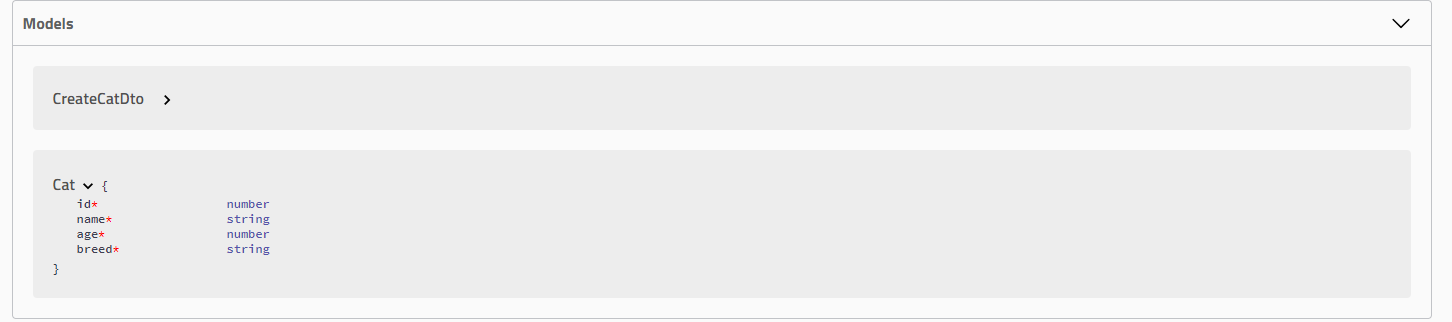
您可以使用 DocumentBuilder 类为所有端点定义全局响应,而不是为每个端点或控制器单独定义响应。当您想为应用程序中的所有端点定义全局响应时(例如,对于 401 Unauthorized 或 500 Internal Server Error 等错误),此方法很有用。
const config = new DocumentBuilder()
  .addGlobalResponse({
    status: 500,
    description: 'Internal server error',
  })
  // 其他配置
  .build();
文件上传
您可以使用 @ApiBody 装饰器与 @ApiConsumes() 一起为特定方法启用文件上传。这是使用文件上传技术的完整示例:
@UseInterceptors(FileInterceptor('file'))
@ApiConsumes('multipart/form-data')
@ApiBody({
  description: 'List of cats',
  type: FileUploadDto,
})
uploadFile(@UploadedFile() file: Express.Multer.File) {}
其中 FileUploadDto 定义如下:
class FileUploadDto {
  @ApiProperty({ type: 'string', format: 'binary' })
  file: any;
}
要处理多个文件上传,您可以按如下方式定义 FilesUploadDto:
class FilesUploadDto {
  @ApiProperty({ type: 'array', items: { type: 'string', format: 'binary' } })
  files: any[];
}
扩展
要向请求添加扩展,请使用 @ApiExtension() 装饰器。扩展名必须以 x- 为前缀。
@ApiExtension('x-foo', { hello: 'world' })
高级:泛型 ApiResponse
通过提供原始定义的能力,我们可以为 Swagger UI 定义泛型模式。假设我们有以下 DTO:
export class PaginatedDto<TData> {
  @ApiProperty()
  total: number;

  @ApiProperty()
  limit: number;

  @ApiProperty()
  offset: number;

  results: TData[];
}
我们跳过装饰 results,因为我们稍后将为其提供原始定义。现在,让我们定义另一个 DTO 并将其命名为 CatDto,如下所示:
export class CatDto {
  @ApiProperty()
  name: string;

  @ApiProperty()
  age: number;

  @ApiProperty()
  breed: string;
}
有了这个,我们可以定义一个 PaginatedDto<CatDto> 响应,如下所示:
@ApiOkResponse({
  schema: {
    allOf: [
      { $ref: getSchemaPath(PaginatedDto) },
      {
        properties: {
          results: {
            type: 'array',
            items: { $ref: getSchemaPath(CatDto) },
          },
        },
      },
    ],
  },
})
async findAll(): Promise<PaginatedDto<CatDto>> {}
在此示例中,我们指定响应将具有 PaginatedDto 的 allOf,并且 results 属性将是 Array<CatDto> 类型。
getSchemaPath()函数返回给定模型在 OpenAPI 规范文件中的 OpenAPI 模式路径。allOf是 OAS 3 提供的一个概念,用于涵盖各种继承相关的用例。
最后,由于 PaginatedDto 没有被任何控制器直接引用,SwaggerModule 将无法生成相应的模型定义。在这种情况下,我们必须将其添加为额外模型。例如,我们可以在控制器级别使用 @ApiExtraModels() 装饰器,如下所示:
@Controller('cats')
@ApiExtraModels(PaginatedDto)
export class CatsController {}
如果您现在运行 Swagger,此特定端点生成的 swagger.json 应该定义以下响应:
"responses": {
  "200": {
    "description": "",
    "content": {
      "application/json": {
        "schema": {
          "allOf": [
            {
              "$ref": "#/components/schemas/PaginatedDto"
            },
            {
              "properties": {
                "results": {
                  "$ref": "#/components/schemas/CatDto"
                }
              }
            }
          ]
        }
      }
    }
  }
}
为了使其可重用,我们可以为 PaginatedDto 创建一个自定义装饰器,如下所示:
export const ApiPaginatedResponse = <TModel extends Type<any>>(
  model: TModel,
) => {
  return applyDecorators(
    ApiExtraModels(PaginatedDto, model),
    ApiOkResponse({
      schema: {
        allOf: [
          { $ref: getSchemaPath(PaginatedDto) },
          {
            properties: {
              results: {
                type: 'array',
                items: { $ref: getSchemaPath(model) },
              },
            },
          },
        ],
      },
    }),
  );
};
提示 Type<any> 接口和 applyDecorators 函数从 @nestjs/common 包导入。
为了确保 SwaggerModule 将为我们的模型生成定义,我们必须将其添加为额外模型,就像我们之前在控制器中对 PaginatedDto 所做的那样。
有了这个,我们可以在端点上使用自定义的 @ApiPaginatedResponse() 装饰器:
@ApiPaginatedResponse(CatDto)
async findAll(): Promise<PaginatedDto<CatDto>> {}
对于客户端生成工具,这种方法在如何为客户端生成 PaginatedResponse<TModel> 方面存在歧义。以下代码片段是上述 GET / 端点的客户端生成器结果示例。
// Angular
findAll(): Observable<{ total: number, limit: number, offset: number, results: CatDto[] }>
如您所见,这里的返回类型是模糊的。要解决此问题,您可以向 ApiPaginatedResponse 的 schema 添加 title 属性:
export const ApiPaginatedResponse = <TModel extends Type<any>>(
  model: TModel,
) => {
  return applyDecorators(
    ApiOkResponse({
      schema: {
        title: `PaginatedResponseOf${model.name}`,
        allOf: [
          // ...
        ],
      },
    }),
  );
};
现在客户端生成器工具的结果将变成:
// Angular
findAll(): Observable<PaginatedResponseOfCatDto>